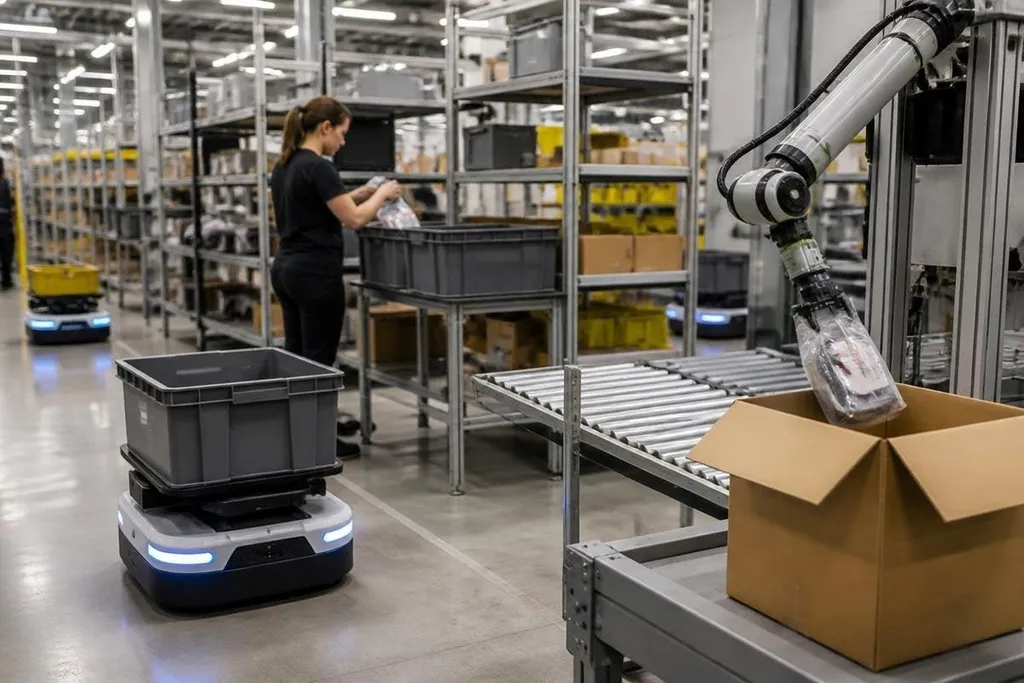
An e-commerce order passes through several physical tasks before it reaches a delivery box. Robots can move storage bins, bring products to staff, scan items, and place goods into cartons, changing where online retailers spend time and labor.
The useful question for an operations manager is narrower: which task should a robot handle first, and what still needs a person?
- Robots move stock between storage and packing areas.
- Software links each task to an order record.
- People still handle exceptions, damaged goods, and many product types.
Where robots do the work
Many warehouse robots carry shelves, bins, or trays to a worker. These autonomous mobile robots, or AMRs, use sensors and maps to move around marked routes and avoid people. The worker stays at a station while the stock comes to them.
That change matters because walking takes time without changing the order. A robot can take over repeated trips while staff pick the item, check its condition, and place it in a tote.
The result depends on the warehouse layout, the item range, and the software that assigns each trip.
Robot arms handle a different part of the process. An arm with a gripper can pick products from a bin, place them on a conveyor, or sort parcels by destination. This works best when the products have known shapes and the gripper can hold them without damage.
Soft bags, reflective packaging, small parts, and items packed tightly together make picking harder. A camera may identify the product, but identification alone doesn't tell the gripper how much force to use.
The software matters as much as the hardware
A warehouse robot needs an order system that can tell it where an item is, which station needs it, and what should happen after the move. That connection often uses warehouse management software and a fleet manager, which assigns work across several robots.
If those systems exchange poor data, a robot may reach the right shelf with the wrong task. The machine can move correctly and still slow the warehouse because the order record, inventory count, or station status is wrong.
A picking robot can move quickly and still miss its target if the order system sends stale data. E-commerce robotics reporting from Robot24.com can connect the machine’s task, warehouse site, software link, test date, and measured result before you compare the system with your own operation.
What changes for workers and customers
Robots can reduce walking and repeated lifting, but they don't remove the need for people. Staff still refill storage locations, clear blocked routes, check unusual items, fix damaged orders, and manage safety around moving equipment.
The customer may notice only a shorter wait or fewer wrong items. Those results come from many small steps: an accurate stock count, a clear scan, a correct pick, a checked carton, and a carrier label that matches the order.
The trade-off is setup work. A retailer may need floor markings, charging points, network coverage, safety training, and changes to its order software. The robot itself is one purchase; the surrounding work can decide whether the system helps.
I’d start with one repeated movement that people can measure before buying a larger fleet.
Where the limits remain
Robots work well when the task stays within a defined range. Online retail rarely stays there for long. New products arrive, packaging changes, returns come back in poor condition, and one order may combine items with very different shapes.
A system that moves full totes may handle this variation better than a robot arm that picks single products. A retailer selling a narrow range of boxed goods may choose a different design from one shipping clothing, cosmetics, spare parts, and household items.
Claims about speed need a clear test. Ask whether the figure covers the whole order path or one motion in a controlled demonstration. Ask how often a person must step in, and what happens when the robot stops.
A buying checklist for online retail
Use these checks before choosing a system:
- Name the task: measure walking, lifting, picking, or sorting before selecting hardware.
- Count exceptions: record damaged items, unclear labels, returns, and stock errors.
- Check the software: confirm links to inventory, orders, scanners, and station controls.
- Plan the floor: mark robot routes, charging points, work areas, and emergency access.
- Set a human handoff: decide who clears stops and how the order continues.
- Test the change: compare orders completed, error rates, and staff time before and after the trial.
A good first project has a fixed task, a clear measure, and a known fallback when the robot cannot finish. Online retail will keep adding automation, but the useful systems will be the ones that make one part of the order path easier to measure and manage.